Connect. Verify. Exchange.
From installation to your first published guest post in under 10 minutes. Here is exactly how Consolety works, step by step.
Install and Connect Your Google Search Console
Start by installing the Consolety plugin from the WordPress plugin repository. It installs like any other plugin - search, install, activate. No technical configuration needed.
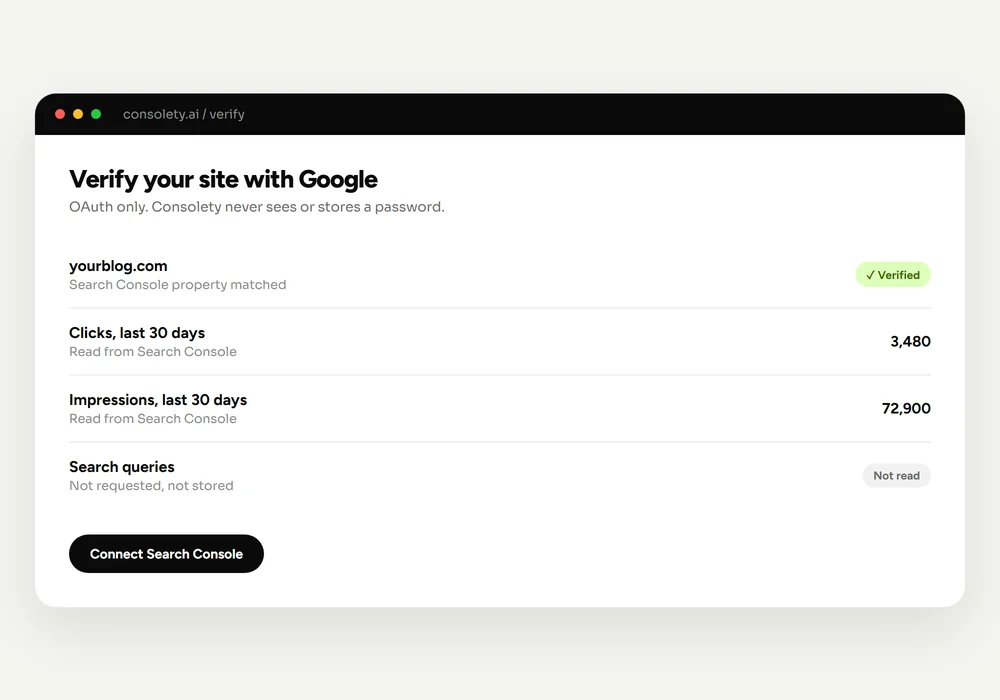
After activation, you will see the Consolety dashboard in your WordPress admin. The first step is connecting your Google Search Console. Click the connect button and sign in with your Google account through secure OAuth authentication.
Once connected, Consolety verifies that you have access to the Google Search Console property for your domain. This confirms you are the legitimate owner or administrator of the site - not a reseller, not a link broker, not a PBN operator.
Install + Connect GSC
Under 60 seconds via secure OAuth
Get Verified and Discover the Network
After GSC verification, your site receives the verified badge and appears in the Consolety network. Other publishers can now find you, and you can discover them.
The network discovery dashboard shows all verified publishers. You can filter by category, language, and activity level. Each publisher profile shows their site details and guest post requirements, so you know exactly what content they are looking for.
What makes GSC verification different?
Unlike Domain Authority or other third-party scores, Google Search Console ownership cannot be faked. When you see a verified badge in Consolety, you know:
- The publisher has direct access to Google's data for their site
- Google recognizes them as the property owner or administrator
- The site is indexed in Google Search and receives real impressions
- The person managing the site has full control over their Google Search Console
This is the foundation of trust that eliminates fake domain authority and makes Consolety fundamentally different from traditional guest posting services.
Exchange Guest Posts With Verified Publishers
Now the real work begins. You have two paths for building backlinks through Consolety: submitting guest posts to other sites, and hosting guest posts from other publishers on your site.
Submitting Guest Posts
Find a publisher you want to get a backlink from. Connect with them through a connection request. Once connected, use the built-in WYSIWYG editor to write a guest post that matches their requirements. Submit your proposal and wait for the host to review it.
The host can approve, request revisions, or decline your submission. When approved, the post publishes directly to their WordPress site with your byline and backlink. You spend 30 points per submission.
Hosting Guest Posts
Other verified publishers will send you guest post proposals. Review them in your Consolety dashboard. If the content meets your standards, approve it and publish with one click. You earn 15 points (Free) or 20 points (Pro) for every guest post you host.
Write, Submit, Publish
Everything happens inside WordPress
Security and Privacy
Consolety is built with security and privacy as core principles. Here is how we protect your data and your site:
- OAuth authentication: No passwords are ever shared with Consolety. Google OAuth handles authentication securely, and you can revoke access at any time.
- What we read from GSC: four site-wide totals, once a month - clicks, impressions, CTR and average position over the last 30 days. Clicks and impressions appear on your publisher card. Search queries, page-level data and everything else in your Google account are never accessed.
- Content ownership: You retain full ownership of all content you create. Guest posts are published on the host's site with your attribution.
- No tracking scripts: Consolety does not inject any tracking code into your frontend. The plugin operates entirely in the admin dashboard.
- GDPR compliant: Full data export and deletion capabilities. You can remove your data from the network at any time.
Read our complete privacy policy and terms of service for full details on data handling and user rights.